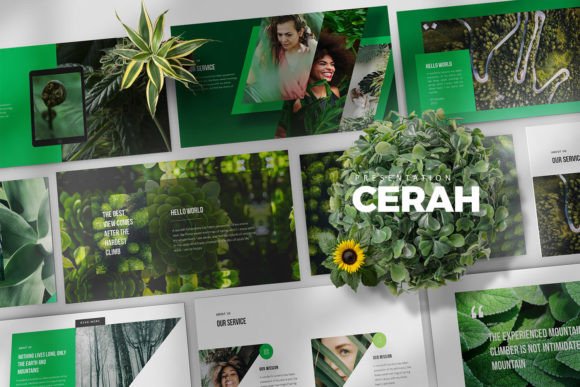
Cerah Google Slides Templates: Crafting Visual Narratives That Resonate
Beyond the Blank Canvas: Why Your Presentation Deserves a Professional Framework
We have all been there: staring at a blank Google Slides interface, cursor blinking, with a deadline looming. The temptation is to grab the first generic template you find and start typing. But for designers, entrepreneurs, and marketers, a presentation is more than just a series of slides; it is a visual narrative, a brand story, and a crucial tool for persuasion. This is where the Cerah Google Slides Templates step in. They offer more than just pre-made layouts; they provide a flexible, professional foundation designed to make your ideas shine. Whether you are pitching to investors, presenting quarterly results, or launching a new product, your visual backdrop matters immensely.
The name "Cerah" itself suggests clarity and brightness, and the template lives up to this. It avoids the clutter and dated aesthetics that plague so many corporate presentations. Instead, it embraces a clean, creative, simple approach. This isn't about flashy animations or distracting transitions; it is about modern typography and intelligent use of space. The personality of these templates is one of confident minimalism. It allows your content to breathe, ensuring that your audience focuses on your message, not on deciphering a complex visual design. For anyone serious about their professional image, starting with a strong design asset like this is a non-negotiable first step.
Visual Strengths: Understanding the "Cerah" Aesthetic
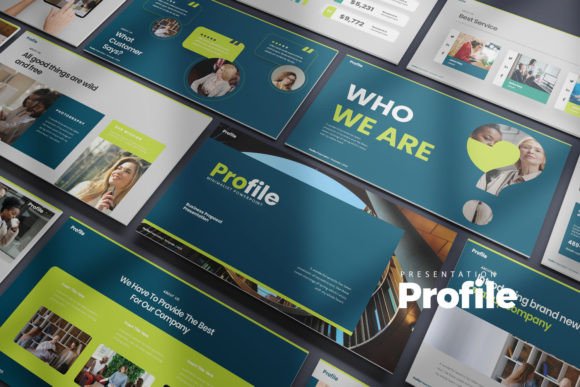
What makes a presentation template truly effective? It is the balance between visual interest and functional clarity. The Cerah Google Slides Templates achieve this through a few key design choices. First, the layout is unique and scalable. You are not locked into a rigid structure. The 30 unique slides (60 total when you include the light and dark versions) offer a variety of arrangements for text, imagery, and data visualization. This flexibility is crucial for brand identity work. You can adapt the slides to match your specific color palette and typographic hierarchy without fighting the template's design.
The inclusion of vector icons, elements, and world maps is a significant practical advantage. In many templates, these assets are an afterthought, but here they are integrated seamlessly. This means you can illustrate complex concepts, highlight global markets, or add visual cues without hunting for external graphics. The 16:9 aspect ratio is the modern standard, ensuring your presentation looks crisp on any screen, from a laptop to a large conference monitor. The design feels both corporate and creative, a difficult balance to strike. It is professional enough for a boardroom but stylish enough for a creative agency pitch.
Practical Application: From Pitch Decks to Brand Guidelines
Let's talk about real-world use cases. For the entrepreneur, the Cerah Google Slides Templates are ideal for pitch decks. The clean lines and ample white space project confidence and organization. Investors are looking for clarity, and a well-structured slide deck subconsciously signals that your business operations are equally well-organized. For marketers, these templates are a powerhouse for campaign presentations and social media strategy overviews. The visual hierarchy built into the slides guides the eye naturally, making it easier to present data-driven insights and creative concepts side-by-side.
Designers and brand strategists will appreciate the template's neutrality. It acts as a perfect canvas for showcasing logo design concepts or brand identity guidelines. Because the typography is clean and the layouts are simple, your work remains the hero. It does not compete with your portfolio. For bloggers and content creators, think beyond the traditional presentation. These slides can be repurposed for Instagram carousels, Pinterest graphics, or even as a base for creating social media graphics. The scalability of the vector elements ensures that your graphics remain sharp across all digital platforms.
Mastering Customization and Workflow
A template is only as good as your ability to customize it. The Cerah Google Slides Templates are built with the user in mind, ensuring that all elements are easily editable. This is where the practical value truly lies. You are not just buying a static image; you are acquiring a dynamic design asset. The ability to switch between light and dark template versions is particularly useful. A dark background can add drama and focus for a keynote-style talk, while a light background is often better for detailed reading and data-heavy slides.
One critical step, often overlooked, is typography. The package specifies the use of free fonts and provides a PDF with links. As a professional, always install these fonts before opening the file to maintain the intended design integrity. While the template uses free fonts, you can certainly swap them out for a premium font if your brand guidelines require it. Consider how a sans serif font like the one included pairs with a serif font for body text. This kind of font pairing adds sophistication and improves readability. The goal is to maintain consistency across every slide, reinforcing your brand perception and professionalism.
Final Thoughts on Presentation Strategy
In the end, a presentation is a conversation. The Cerah Google Slides Templates provide the visual vocabulary for that conversation. They help you structure your thoughts, emphasize key points, and maintain audience engagement. By choosing a template that is both creative and corporate, you bridge the gap between being informative and being inspiring. Whether you are a small business owner presenting to your team or a publisher pitching a new series, the tools you use reflect your standards. Investing in a high-quality, flexible template is an investment in your own credibility. It ensures that when you stand up to present, your visuals are working just as hard as you are.