Transform Your Book Marketing with 8x10 KDP Mockups
Creating a professional presentation for your self-published book shouldn't require expensive software or advanced design skills. Book mockup templates designed specifically for 8x10 KDP dimensions offer a straightforward solution for authors, publishers, and content creators who need polished visuals without the learning curve. These templates bridge the gap between having a finished manuscript and presenting it in a way that captures attention and drives sales.
What Makes These Mockup Templates Stand Out
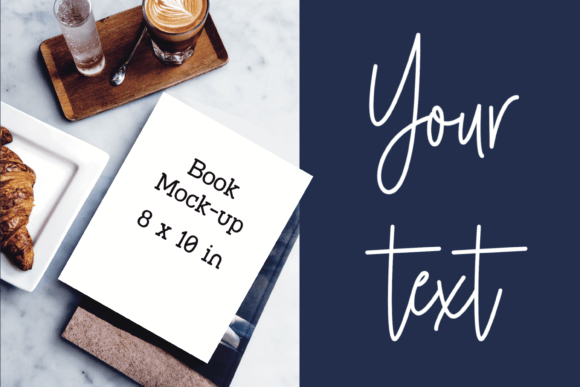
At its core, a book mockup template for 8x10 KDP marketing serves as a pre-designed stage for your book cover. Think of it as a professionally lit photograph of a blank book, waiting for your design to take center stage. The visual style typically leans toward clean, modern aesthetics—soft shadows, neutral backgrounds, and realistic textures that mimic how a physical book would appear in someone's hands or on a shelf. The personality is versatile rather than flashy, designed to complement your cover art rather than compete with it.
The appeal lies in its adaptability. Whether you're showcasing a minimalist journal, a vibrant children's coloring book, or a sophisticated literary novel, the mockup provides a credible context. The 8x10 inch dimension is particularly valuable because it aligns with a popular trim size for KDP (Kindle Direct Publishing), making it directly applicable for Amazon listings, author websites, and promotional materials. The file format is a high-resolution JPEG at 3000x2000 pixels, which ensures crisp detail for both digital screens and moderate-sized prints.
For creators who don't use programs like Adobe Photoshop or Illustrator on a daily basis, this simplicity is a major advantage. You can open the JPEG in a basic image editor—even a free one—and layer your cover design on top. This approach eliminates the need to understand complex features like smart objects or clipping masks, which are often required by more advanced PSD mockup files.
Where to Use Your Book Mockup for Maximum Impact
The applications for a well-crafted book mockup extend far beyond a single Amazon listing. Its strength is in creating a consistent visual narrative across multiple platforms, which is fundamental to building a recognizable brand identity.
- KDP A+ Content and Enhanced Brand Content: This is perhaps the most direct use. Amazon's A+ Content allows you to add images and text modules below your book's product description. A professional mockup here can significantly increase conversion rates by helping potential buyers visualize the physical product, understand its scale, and see it in a relatable setting.
- Social Media Marketing: Platforms like Instagram, Pinterest, and Facebook are highly visual. A mockup template lets you create engaging posts, carousel images, and stories that announce a new release, celebrate a milestone, or run a promotion. It adds a layer of professionalism that a flat, isolated cover image often lacks.
- Online Shops and Portfolio Sites: If you sell directly through your own website, Etsy, or Shopify, mockups create a cohesive and trustworthy storefront. For designers and illustrators, including mockup presentations in your portfolio demonstrates an understanding of how design assets are applied in real-world marketing scenarios.
- Blogs and Email Newsletters: Illustrating a blog post about your writing process or a newsletter announcing a launch with a mockup image makes the content more engaging and shareable. It transforms abstract text into a tangible product your audience can connect with.
Using the same mockup style across these channels builds visual consistency. When a follower on Instagram clicks through to your Amazon page, the familiar presentation style creates a seamless experience, reinforcing your professionalism and attention to detail.
Practical Guidance for Choosing and Using Mockup Templates
Not all mockups are created equal, and selecting the right one requires a bit of evaluation. Here’s how to approach it with a practical mindset.
Evaluate the Scene and Context: Look beyond the blank book. Does the setting align with your book's genre or your brand's personality? A mockup on a rustic wooden table suits a cozy mystery or a nature journal, while one on a sleek marble surface might better fit a business book or contemporary fiction. The environment should tell a subtle story that resonates with your target audience.
Assess the Lighting and Shadows: Realistic lighting is what separates a good mockup from an amateur one. Look for consistent light sources and soft, natural shadows. Harsh or unrealistic shadows can make your final image look cheap and poorly composited. The goal is to make your cover appear as if it were physically printed and photographed.
Test Font Pairings and Readability: While the mockup itself doesn't contain fonts, the way your cover text interacts with the mockup's background is crucial. If your book title uses a delicate script font, ensure it remains legible against the mockup's texture. A bold sans serif font might stand out better on a busy background. Always view your final composite at 100% zoom to check for clarity.
Consider Commercial Licensing: Since you're likely using these mockups for commercial purposes—to sell books—you must verify the license. The product description should clearly state that commercial use is permitted. Avoid any templates with ambiguous licensing that could put your business at risk.
Keep It Simple and Focused: The mockup's role is to support your book, not overshadow it. Choose templates that are relatively simple and free of distracting elements. The viewer's eye should be drawn immediately to your cover design. A cluttered scene with too many props can dilute your message.
When you open the JPEG file, the process is intuitive. In your editor, you'll place your cover image as a new layer over the template. Using basic transform tools, you'll scale and skew your cover to match the perspective of the book in the mockup. This might involve a slight distortion to make the cover appear to wrap around the book's spine, adding to the realism. Once aligned, you can flatten the image and save it for its intended use.
In a crowded digital marketplace, presentation is a critical component of success. A high-quality book mockup template for 8x10 KDP marketing is more than just a pretty picture; it's a practical design asset that elevates your brand, communicates value to your audience, and ultimately supports your marketing goals. It empowers you to create compelling visuals that stand shoulder-to-shoulder with traditionally published books, regardless of your graphic design experience. By investing in a versatile and well-crafted mockup, you're investing in the professional perception of your work.